Job Costing & Expense Tracking

Snap a photo of any receipt and FieldFuze's AI files it to the right job automatically. Track every expense per job and watch true cost, revenue, and gross margin update in real time, before the job is even finished.

Know Your Real Profit on Every Job

Most contractors do not find out whether a job actually made money until weeks after it is finished, once the receipts are dug out of the truck, the cab, and someone's jacket pocket and finally reconciled against the invoice. By then it is far too late to do anything about it.

FieldFuze closes that gap. Snap a photo of any receipt from the job site, fuel, materials, a dump run, an equipment rental, and FieldFuze's AI reads the receipt and files the expense against the right job automatically. No typing, no spreadsheet, no shoebox at tax time.

Every expense rolls straight into that job's costing. You see the contract value, what you have collected, what you have spent, and your gross margin live, while there is still time to adjust the crew, the scope, or the next change order.

Snap It. The AI Does the Rest.

From a receipt in the parking lot to a line on the job's P&L, in seconds. No typing.

Roofing nails 3in58.44
Ice & water shield142.00
Drip edge 10ft31.20
Tax16.53
TOTAL$248.17
1 · Snap the receipt on-site
→
✦ FieldFuze AI
Amount $248.17 high
Merchant The Home Depot high
Date Nov 4, 2026 high
Category Materials high
2 · AI reads every field
→
Materials+$248.17
Filed to: 5512 E Paseo Cimarron
Gross margin 28.6% live
3 · On the job, in the margin
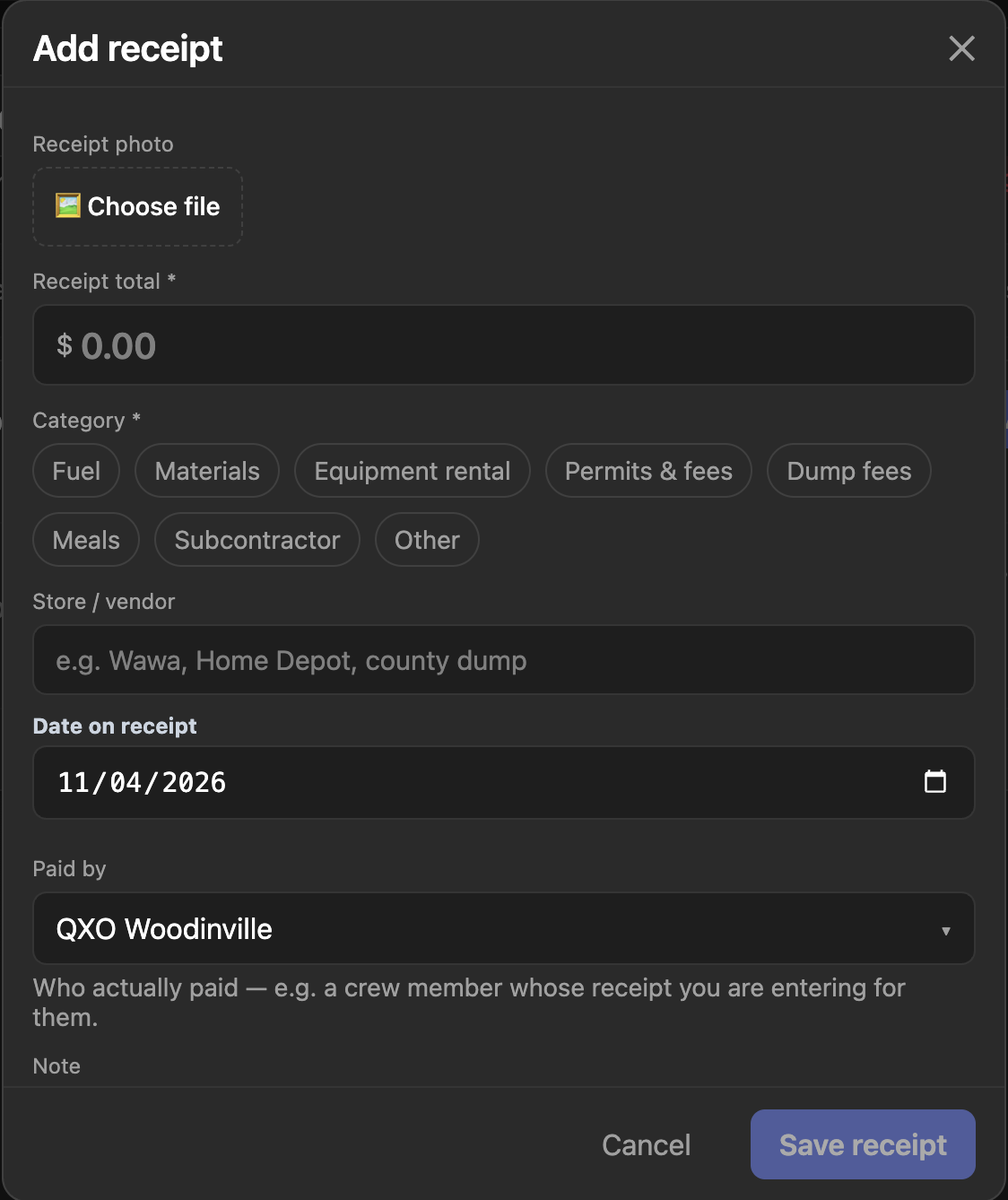
FieldFuze Add receipt screen: photo capture and expense categories

The real Add receipt screen in the app — choose a photo and the AI fills the amount, merchant, date, and category (one of eight job-cost buckets), plus who paid.

What You Get

Field-captured costs and real-time margin on every job.

AI Receipt Capture

Snap a photo of any receipt and FieldFuze's AI reads the vendor, amount, and date and files it to the right job automatically. No manual entry and no receipts lost in the truck.

Per-Job Expense Tracking

Every expense is tagged to the job it belongs to and sorted by category: fuel, materials, equipment rental, permits & fees, dump fees, meals, subcontractor, and more.

Live Gross Margin

FieldFuze measures contract value against materials and logged field expenses to show gross margin in dollars and percent, green when you are ahead, red when a job is slipping.

Materials Budget vs. Actual

Track the material cost you estimated against what has actually been ordered and invoiced, with the variance called out so overruns surface early, not at closeout.

Reimbursables & Who Paid

Mark any receipt paid out of pocket as reimbursable, and FieldFuze records who paid, so crew reimbursements and field spend never slip through the cracks.

Field and Office in Sync

Crews snap receipts from the job site; the office sees every expense and the updated margin the moment it is added. No end-of-month reconciliation scramble.

Estimated vs. Actual P&L

A per-job profit statement — revenue, materials, labor & subs, sales commission — with what you estimated beside what actually landed, and the gross margin on both.

Catches Double-Counts

If a receipt matches a purchase order already on the job, or looks like a duplicate you already logged, FieldFuze warns you before it skews the margin.

How the AI Reads Your Receipt

FieldFuze runs the receipt image (or PDF) through our advanced AI under a strict schema, so it returns clean, structured data, not a blob of text you have to clean up.

Four fields, each with a confidence

It reads the amount, merchant, date, and category, and tags each one high, medium, or low confidence. It is tuned for job-site receipts: the amount is the final total after tax and any handwritten tip (never the subtotal or "change due"), the merchant is the brand only, and the category maps to one of your eight job-cost buckets.

Money is never guessed into the form

A high-confidence amount fills automatically; anything less becomes a "Receipt reads $248.17, tap to use" chip you confirm. It never overwrites a field you have already typed, it flags refunds and returns, and if it cannot read the image it stays silent, so a bad guess never lands on a job.

Private by design

The receipt image, the amount, and the merchant are never written to logs. Receipts live in their own secure space on the job, separate from job photos, so they never appear in the Photos tab or anything a customer sees.

See Your Margin Live

Every receipt, purchase order, and payment rolls into one per-job profit statement, your estimate beside what actually landed.

Job Costing
5512 E Paseo Cimarron
To date
Revenue (contract)$22,900.00
CostEstimatedActual
Materials$9,900.00$10,140.00
Labor & subs$4,800.00$4,650.00
Other (fuel, dump, meals)—$420.00
Sales commission$1,145.00$1,145.00
Gross profitest $7,055$6,545.00
Gross marginest 30.8%28.6%

Illustrative — the signed $22,900 roof from our proposal sample. Actuals update as receipts, purchase orders, and payments land; an actual falls back to your estimate until something real arrives, so a brand-new job never shows a fake 100% margin.

From a Shoebox of Receipts to Real Numbers

Field spend is where job profit quietly leaks. A tank of fuel here, a dump run there, a last-minute material pickup, a tool rental for one tough day, and none of it ever makes it onto the invoice or into the math. The job "felt" profitable, but nobody can say by how much.

Snap it on-site, and it is handled

Your crew photographs the receipt before it ever leaves the parking lot. FieldFuze's AI pulls the vendor, total, and date off the image and files the expense against that exact job, in the right category, in seconds. The paper can go in the trash.

Costing that is always current

On each job's costing view you see contract value, collected, and balance due alongside your materials budget, what is committed on open orders, and what has actually been invoiced, plus every field receipt by category. FieldFuze does the math and shows gross margin in dollars and percentage so the real number is never a surprise.

A Step Above a Spreadsheet

Most contractors track job costs in a shoebox, a spreadsheet, or not at all. Here is the difference.

Receipts & a spreadsheet

  • Receipts pile up in the truck until tax time
  • Hand-type every expense, if it survives the wash
  • Guess which job it belonged to
  • Profit is a surprise weeks after the job ends
  • Field spend quietly leaks off the invoice
  • Office and crew never see the same number

FieldFuze job costing

  • Snap it on-site; the paper can go in the trash
  • AI reads the amount, merchant, date & category
  • Filed to the exact job automatically
  • Live gross margin in $ and %, mid-job
  • Every receipt lands in the P&L by category
  • Field and office on one live number

Common Questions

Snap a photo of a receipt from the job site and FieldFuze's AI reads the vendor, amount, and date and automatically files the expense against the correct job. It flows straight into that job's costing and gross margin, so there is no manual data entry, no spreadsheet, and no pile of receipts to reconcile later.

FieldFuze tracks per-job expenses by category: fuel, materials, equipment rental, permits and fees, dump fees, meals, subcontractor costs, and other. Each receipt can be marked reimbursable and records who paid, and every expense rolls into the job's cost and gross margin.

FieldFuze compares a job's contract value (approved estimates plus change orders) against its material costs and logged field expenses to show gross margin in both dollars and percentage. The number updates as costs are added, so you see where a job stands before it is finished.

Yes. Anyone assigned to a job can snap a receipt from the field and it files to that job instantly. Managers can review and re-categorize expenses, and every entry rolls into the job's live cost and margin, so the office and the field are always looking at the same numbers.

FieldFuze reads receipts with our own advanced AI, under a strict schema. It returns the amount, merchant, date, and category as structured fields, each with a confidence level, so high-confidence values fill automatically and anything less is offered for you to confirm. Money is never guessed into the form.

Yes. The receipt image, amount, and merchant are never written to logs, and receipts are stored separately from job photos, so they never appear in the Photos tab or anything a customer sees. Only your team members with access to the job can see its expenses.

Related Features

Know Your Margin Before the Job Ends

Snap a receipt and FieldFuze's AI files it to the job. Track true cost and gross margin on every job, free.

Book a Demo